
|
| Frequently asked questions |
|
What is xlsgen?
xlsgen is a software component which reads, writes, calculates, renders and print any Excel spreadsheet.
What makes xlsgen better than the competition?
Price (compared at equivalent feature level, xlsgen is by far a less expensive server). Support. Features. Versatility of programming languages. Backwards compatibility. Calculation engine. Automatic source code generation. Advanced features : sparklines, business intelligence, html cells, ...
Who is PayPro Global ?
PayPro Global is a payment processing partner who is in this business for a long time. They are based in Canada, and support a number of payment methods and currencies including credit cards and paypal. They let xlsgen customers purchase licenses, and provide registration numbers in return.
Who is ARsT Design ?
The company owning, developing and distributing xlsgen. The business is registered in France and as such follows commerce rules applicable to the European Union.
Do I need Excel installed to use xlsgen?
No.
What programming languages are supported?
All COM compatible programming languages are supported. This includes, without naming them all, VB, VBScript, VBA, VB.NET, C#, C, C++, Java, Delphi, Perl, Python, PowerShell, R, Rust.
What execution environments are supported?
You can run xlsgen on a number of execution environments : Third-party dll running inside an arbitrary process, a console/winforms .NET application, a server-side ASP/ASP.NET/PHP service.
Is Windows 64-bit supported?
Yes. We have a 64-bit package and a 32-bit package available for download.
What localized versions exist?
The product object model as well as the documentation is all in English. Formulas can be expressed in English, French, German, Spanish, Italian and Portuguese. You can make a feature request for future localized versions.
Is it Windows-only?
Yes.
If the error #1633 occurs when installing the xlsgen package, what does it mean?
The following error An error occured installing the package. Windows Installer returned '1633'. is raised when the user is trying to install a 64-bit package on a 32-bit operating system. The solution is to download and install a 32-bit package instead.

Are administrative rights required to install the product?
Yes. The program installs in the standard Program Files directory, and thus requires administrative rights. If you are running on Windows Vista, Windows 7, Windows Server 2008, ... please right-click on the .exe file after the download and choose "Run as administrator".
Are administrative rights required to run the product?
No.
Can the Windows XP/Vista/7 limited user restrictions cause access problems?
Probably yes for the License Tool. When you provide a license file to the License Tool, the file is copied to the xlsgen install folder which by default is installed in the standard Program Files folder. Unfortunately, under limited user restrictions, write access to this folder is blocked. If that case occurs, one of the two following solutions can be followed : 1) get a temporary administrative privilege, and manually copy your license file in the xlsgen install folder. Remember to make sure that this file is calledxlsgen.license.lic. 2) Or reinstall the product in a folder likeC:\Documents And Settings\<user name>\Application Data\xlsgen_ARsTDesign.
Can I open Excel files created/updated by xlsgen on my Mac (using Office for Mac) or using OpenOffice?
Probably yes. The answer is not definitive due to the sheer number of products and combinations that make the testing matrix too large to be affordable at the moment. But xlsgen produces native, regular Excel files.
How do I upgrade?
Uninstall. Download the update. Reinstall. There is a tool part of the install called Check Update which lets you know whether a newer version is available on the xlsgen website.
Bug fixes?
Provided for free for the current major version being distributed, and an ongoing basis. If you own a license of version 5.0, you are entitled to get 5.0.0.1, 5.0.0.2, ... for free as long as this is your first year of owning the deployment license or own a valid upgrade license (12 months).
How does the licensing file xlsgen.license.lic work?
When you download a license file from the xlsgen website, by going first to the License Tool and choosing the license, you need to provide it to the License Tool itself in order to do the final step of registering your license (see bottom of the user interface dialog). It creates a copy of the file in the xlsgen install folder. The xlsgen.license.lic file is loaded and checked everytime xlsgen runs.How do I get an idea of what xlsgen can do in five minutes?
Just run one of the numerous code samples provided in the install.
How do I get started without learning the object model?
Start the automatic source code generation tool (xlscodegen.exe) and provide it with an existing Excel file. Choose the programming language of your choice. And voilà, source code ready to use without writing anything.
What are the types of license available to me?
The deployment license lets you install and run the product on multiple machines.
Can I deploy xlsgen across my network?
Yes. More details here.
Can I deploy xlsgen's run-time with my product as an ISV (Independent software vendor)?
Yes. More details here.
I am unsure about the COM registration since my last update. How can I re-register it?
Bring the Windows Start menu, select Run, and type regsvr32 "c:\program files\xlsgen\xlsgen.dll", and press enter. You should receive a message telling that DllRegister has succeeded. On Windows 7, Windows 8, or any version of Windows where the user does not run as an administrator, you may have to use a .bat file, right-click on it and choose Run as administrator.Is the COM registration mandatory?
No. Regardless your programming language and execution environment, you can use a COM-free technique described here to avoid COM registration at all.
Has COM registration anything to do with my license registration?
No.
Server-side environments ASP, ASP.NET or PHP prevent me from writing on the file system. What do I do?
Server applications have default security options which prevent writing on the file system. For ASP/ASP.NET, the steps are described here. For PHP, you probably want to change the folder write options using a command-line such as chmod <folder> 777.Server-side environments ASP.NET 64-bit has troubles starting xlsgen. What do I do?
There are tightened default security settings on ASP.NET 64-bit, which calls for a manual setup. See this explanation.
Why does the documentation do not open correctly?
The documentation file, xlsgen.chm, may raise a security issue. And if the user ignores it, the documentation will not work properly, only the table of contents will show up. To solve the issue, after double-clicking on the documentation file in order to open it, make sure to uncheck the box called Always ask before opening this file, and then click on Open.

Is there any known trap not to fall into when executing .NET applications?
It is a known fact that the .NET garbage collector (implementation is owned by Microsoft) may act irresponsibly for running objects such as xlsgen's. To ensure that the running xlsgen instance does not get disconnected or garbage collected before you're done with it, you may want to declare the xlsgen main engine class as a class member instead of a local object. More best practices are described here.
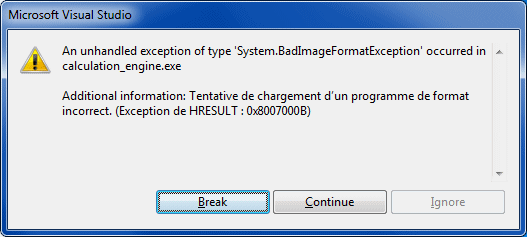
I am running a 64-bit operating system and I run into this bad image format (0x8007000B) problem when I try to load xlsgen. How to solve it?
The bad image format exception being triggered is due to a .exe process trying and failing to load a 32-bit .dll. Or vice versa, a 32-bit .exe trying and failing to load a 64-bit .dll. For instance, if you are using a 64-bit operating system and Visual Studio with a project configured as Any CPU, this will create a 64-bit .exe and as a result the executable won't succeed to load xlsgen if the version installed is 32-bit. To fix the problem, either install the 64-bit version of xlsgen, of create a new build configuration in Visual studio and choose it as x86, which means the .exe will be 32-bit therefore compatible with the installed version of xlsgen.
I am running a 64-bit operating system and I run into a class not registered error (0x80040154) problem when I try to load xlsgen. How to solve it?
Running into a class not registered error can result from one of two causes. The first is that xlsgen is not registered as a COM component. The installer does the COM registration so usually on a new computer this is what should be done. You can always manually ask for a COM registration. This is done by running the registerCOM.bat script which is installed in the same folder than xlsgen.dll by the installer. The other cause for triggering the error is when a .exe process is trying and failing to load a 32-bit .dll. Or vice versa, a 32-bit .exe trying and failing to load a 64-bit .dll. For instance, if you are using a 64-bit operating system and Visual Studio with a project configured as Any CPU, this will create a 64-bit .exe and as a result the executable won't succeed to load xlsgen if the version installed is 32-bit. To fix the problem, either install the 64-bit version of xlsgen, of create a new build configuration in Visual studio and choose it as x86, which means the .exe will be 32-bit therefore compatible with the installed version of xlsgen.

If you are still getting this error message after a manual COM registration, make sure to check the following registry branches depending on whether you are using the 64-bit version or 32-bit version of xlsgen, respectively :NB : {089D25AC-7618-4FEF-9BB1-6FDDF1FD3B3A} is the xlsgen COM component globally unique identifier.
- 64-bit version : HKEY_CLASSES_ROOT / CLSID / {089D25AC-7618-4FEF-9BB1-6FDDF1FD3B3A} / InProcServer32
- 32-bit version : HKEY_CLASSES_ROOT / Wow6432Node / CLSID / {089D25AC-7618-4FEF-9BB1-6FDDF1FD3B3A} / InProcServer32
How can I remove save prompts when I close a spreadsheet that was generated by xlsgen?
Theworkbook.AutoRecalcOnCloseproperty can be used to ensure that there is no prompt after closing a spreadsheet that was generated or updated by xlsgen. Simply set this property asautorecalc_standard.
When I write values in pre-formatted cells, the formatting gets lost.
Use the StyleOption = styleoption_preserve option available from the workbook object. There is a screen-recorded demo available here (Flash required) which shows how this works.Support email?
. Two business days for an answer.