
|
| xlsgen > overview > Rich Formatting |
|
Rich formatting is the ability to use more than one formatting within a cell or merged cells. This capability breaks the inherent limitations of a grid-based cell formatting, as in the example below :
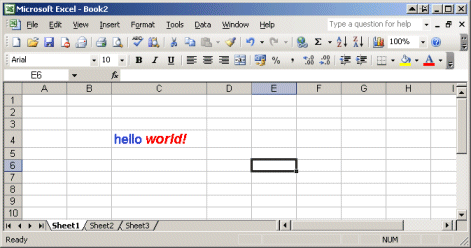
Rich formatting only applies to labels. If you have numbers, dates, or anything else, then make sure to translate it to a label if you want to take advantage of it.
A rich formatting object is exposed by the current worksheet. See the IXlsWorksheet for more information. A rich formatting object must be created first.
A rich formatting provides the ability to iteratively associate a label and a formatting style. That label is a fraction of what makes the full label that gets eventually showed in the cell.
Once the rich label properties are set, the rich label object can be passed onto the current worksheet, in any cell. Or it can be passed to a merged cells object. See IXlsMergedCells for more information.
All those styles must be created first. Styles are either created from the current worksheet, or derived from other styles by duplicating them. See IXlsWorksheet and IXlsStyle for more information.
There is a restriction on styles. Only the font properties are taken into account. See the IXlsFont for more information.
In order to produce the example above, the following code is required :
| VB code |
Dim style As IXlsStyle Set style = wksht.NewStyle style.Font.Size = 14 style.Font.Bold = True style.Font.Color = colorBlue style.Apply Dim style2 As IXlsStyle Set style2 = style.Duplicate style2.Font.Color = colorRed style2.Font.Italic = True Dim rl As IXlsRichLabel Set rl = wksht.NewRichLabel rl.Label "hello ", style rl.Label "world!", style2 wksht.RichLabel(4, 3) = rl wksht.ColWidth(3) = 20 |
| C# code |
IXlsStyle style = wksht.NewStyle();
style.Font.Size = 14;
style.Font.Bold = 1;
style.Font.Color = (int) xlsgen.enumColorPalette.colorBlue;

style.Apply();

IXlsStyle style2 = style.Duplicate();
style2.Font.Color = (int) xlsgen.enumColorPalette.colorRed;
style2.Font.Italic = 1;

IXlsRichLabel rl = wksht.NewRichLabel();
rl.Label("hello ", style);
rl.Label("world!", style2);
wksht.set_RichLabel(4, 3, rl);

wksht.set_ColWidth(3, 20);
|
| C/C++ code |
xlsgen::IXlsStylePtr style = wksht->NewStyle();
style->Font->Size = 14;
style->Font->Bold = TRUE;
style->Font->Color = xlsgen::colorBlue;

style->Apply();

xlsgen::IXlsStylePtr style2 = style->Duplicate();
style2->Font->Color = xlsgen::colorRed;
style2->Font->Italic = TRUE;

xlsgen::IXlsRichLabelPtr rl = wksht->NewRichLabel();
rl->Label("hello ", style);
rl->Label("world!", style2);
wksht->RichLabel[4][3] = rl;

wksht->ColWidth[3] = 20;
|
An alternative for reading or writing rich formatting in cells (or in chart elements, text boxes, ...) is to use HTML markup. The advantage of using HTML markup is that you can do the same than with style objects, but you also have the ease of use of HTML markup.
So in order to create the hello world example :
| Java code |
XlsRichLabel rl = wksht.NewRichLabel();
rl.putHtmlLabel("<font size=\"14\" color=\"0000FF\"><b>hello </b></font><font size=\"14\"  color=\"FF0000\"><b><i>world!</i></b></font>");
wksht.putRichLabel(4, 3, rl);
|
| VB code |
Dim rl As IXlsRichLabel Set rl = wksht.NewRichLabel rl.HtmlLabel = '<font size="14" color="0000FF"><b>hello </b></font><font size="14" color="FF0000"><b><i>world!</i></b></font>' wksht.RichLabel(4, 3) = rl |
| C# code |
IXlsRichLabel rl = wksht.NewRichLabel(); rl.HtmlLabel = "<font size=\"14\" color=\"0000FF\"><b>hello </b></font><font size=\"14\" color=\"FF0000\"><b><i>world!</i></b></font>"; wksht.set_RichLabel(4, 3, rl); |
| C/C++ code |
xlsgen::IXlsRichLabelPtr rl = wksht->NewRichLabel(); rl->HtmlLabel = L"<font size=\"14\" color=\"0000FF\"><b>hello </b></font><font size=\"14\" color=\"FF0000\"><b><i>world!</i></b></font>"; wksht->RichLabel[4][3] = rl; |
HTML markup is pretty straight forward but in fact there is no reason to learn it because the automatic source code generation tool that ships with xlsgen actually generates source code using HTML markup so you can use Excel for setting up a particular content in cells and simply use the tool in order to obtain the corresponding source code.
xlsgen documentation. © ARsT Design all rights reserved.