xlsgen 5.0.0.41 : Fix CSV data importBuild 5.0.0.41 of xlsgen fixes a problem related to importing large CSV files where the tab character is used as a field separator. Before this build, xlsgen would filter out tab characters in headers and unintentionally removing actual field separators, causing misalignment in the imported data. | |
 |  |
xlsgen 5.0.0.40 : Improved HTML data importBuild 5.0.0.40 of xlsgen improves HTML data import by searching for data within a different HTML markup pattern, in addition to the existing one. Before this build, xlsgen searches for data in table tr/td markup. Now it tries to search for data in this HTML pattern, and if it can't find anything, tries to search within hierarchical HTML div sections, which are more used nowadays than regular tables. | |
| |
xlsgen 5.0.0.39 : Transposed CSV data importBuild 5.0.0.39 of xlsgen adds a new capability in the CSV data import, where the input data is layed out vertically i.e. in rows, as opposed to columns. Here is a capture of the input data, i.e. the first actual row of data is made of (A1, B1, C1), then (A2, B2, C2), then ... 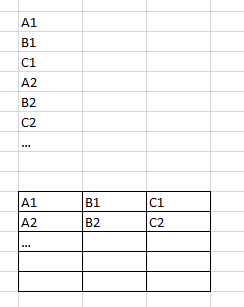 Importing transposed CSV data (above), into regular sheet data (below) And then after instructing the xlsgen CSV import engine that the data is layed out this way : worksheet.Import.CSV.Options.DataInRows = 3; | |
| |