
|
| Sample code : Replicating the Excel 12 data bars with xlsgen |
|
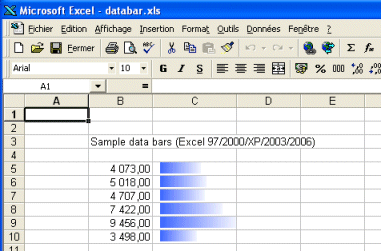
In the following code, we'll replicate the Excel 12 data bars feature which allow to keep bars side by side with figures. Note that if you would like to have truly native data bars (for Excel 2007 and more recent versions), you may want to use the corresponding interface available in xlsgen, and take a look at the corresponding page in our documentation. The good news is that with the sample code provided, data bars become visible and useable on older Excel versions. The following code is written in C#, you'll have to make the appropriate translations if you want this code in another language.
| C# code |
xlsgen.CoXlsEngine excel = new xlsgen.CoXlsEngine();

IXlsWorkbook wbk = excel.New( @"databar.xls" );
IXlsWorksheet wksht = wbk.AddWorksheet( "samplesheet" );

IXlsStyle style = wksht.NewStyle();
style.Format = "#,###.00";
style.Apply();

wksht.get_Columns("C1:C1").Width = 15;

double[] myfigures = new double[] {
                                     4073.00,
                                     5018.00,
                                     4707.00,
                                     7422.00,
                                     9456.00,
                                     3498.00
                                  };

// compute max off the list
double m = myfigures[0];
foreach(double d in myfigures)
  if (m < d) m = d;

// create the data bars
for (int i = 0; i < myfigures.Length; i++)
{
  wksht.set_Float(5 + i, 2, myfigures[i]);

  wksht.NewPicture(@"databar1.jpg",
                   5 + i, 3, /* top-left corner cell*/
                   5 + i, 3, /* bottom-right corner cell*/
                   10, /*top*/
                   100, /*left*/
                   30, /*bottom*/
                   (int)(1000 * (1 - myfigures[i] / m)) /*right*/);
}

wksht.set_Label(3,2, "Sample data bars (Excel 97/2000/XP/2003/2006)");

wbk.Close();

System.Diagnostics.Process.Start( @"databar.xls" );

excel = null;
|
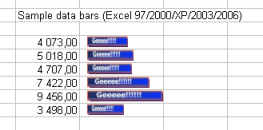
The good news is that since the data bar elements are pictures, it's really up to you to choose the picture of your choice. Here is a different one :
The C# source code complete with project workspace can be found here in a zip file.